In modern cloud engineering, designing an application architecture isn't just about spinning up virtual machines or pushing containers to the cloud. Real-world enterprise environments demand high availability, fault tolerance, strict network isolation, automated scaling, zero plaintext secrets, and reproducible Infrastructure as Code (IaC).
I recently open-sourced a complete, production-ready implementation of a Three-Tier AWS platform built with modular Terraform. In this article, I will break down the end-to-end architecture, the network flow, least-privilege IAM controls, and how we automated multi-environment deployments (dev, staging, prod) using GitHub Actions with OpenID Connect (OIDC).
terraform-aws-3tier-platform
Fully modular Terraform codebase featuring 14 reusable modules, multi-environment support, security scanning (Checkov/tfsec), and GitHub Actions OIDC CI/CD.
1. The 3-Tier Architectural Blueprint
A classic three-tier architecture separates concerns into discrete presentation, application, and data layers. In this cloud-native design, each tier is mapped directly to AWS managed services spanning two Availability Zones (AZ-A and AZ-B) within a dedicated VPC (10.0.0.0/16):
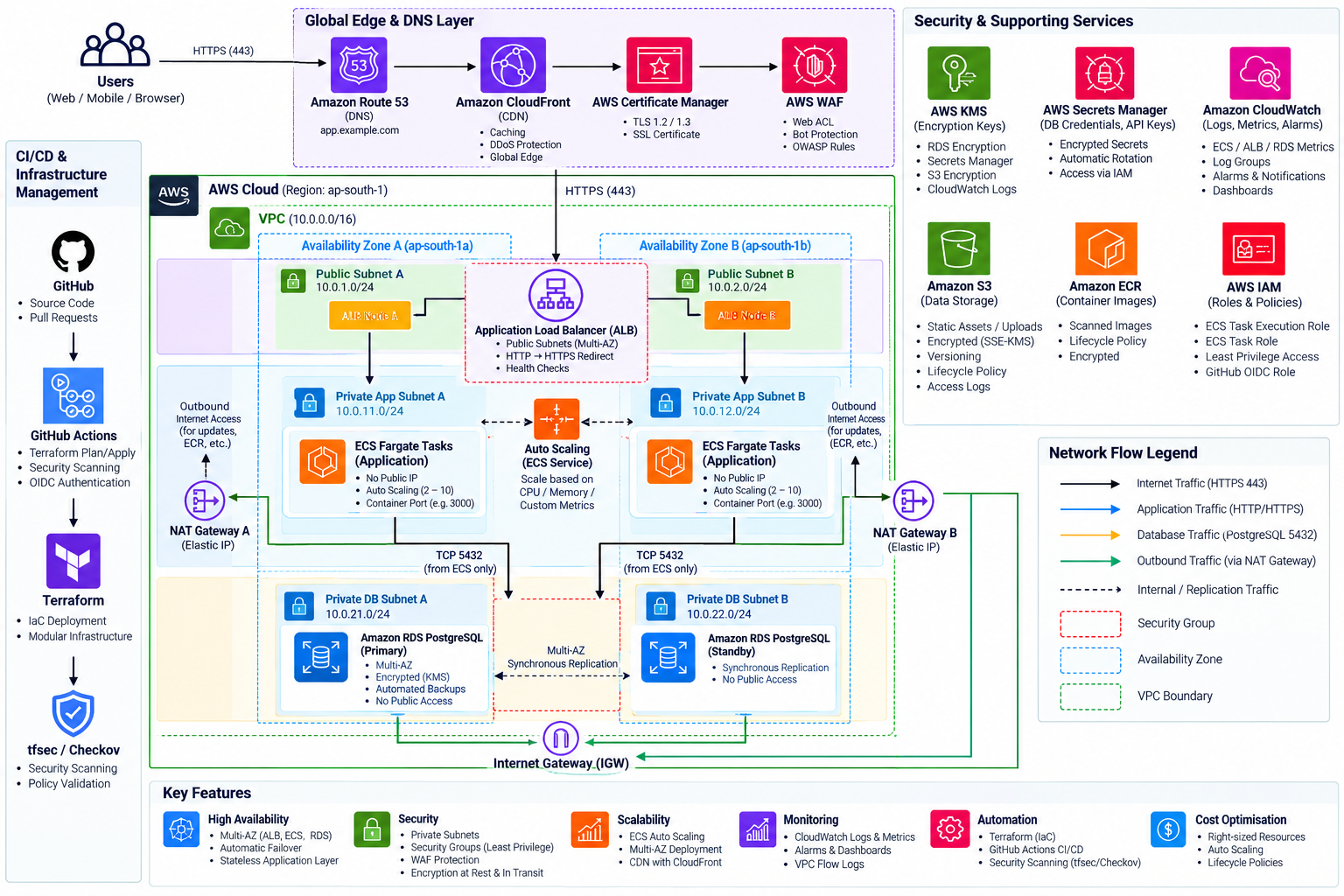
End-to-End Network Traffic Flow
Traffic travels unidirectionally through hardened security boundaries:
Internet Users
      │
      ▼
Route 53 (Authoritative DNS Resolution)
      │
      ▼
Amazon CloudFront (Edge Delivery & Global Caching)
      │
      ▼
AWS WAF (Threat Inspection: SQLi, XSS, Rate Limiting)
      │
      ▼
Application Load Balancer (Public Subnets, Multi-AZ)
      │
      ▼ (Port 80/Container Port)
Amazon ECS Fargate Tasks (Private App Subnets, Zero Public IP)
      │
      ▼ (TCP Port 5432 Ingress Only)
Amazon RDS PostgreSQL (Private DB Subnets, Multi-AZ Standby)
2. Deep Dive: Layer-by-Layer Breakdown
Tier 1 — Presentation / Web Layer
The presentation layer handles public ingestion, edge delivery, and traffic validation:
- Amazon Route 53 manages authoritative DNS records, pointing custom subdomains directly to the entry point.
- Amazon CloudFront & AWS WAF cache static assets at edge points of presence while actively inspecting inbound payloads for malicious signatures.
- AWS Certificate Manager (ACM) issues and manages public TLS certificates with DNS validation.
- Application Load Balancer (ALB) spans public subnets (
10.0.1.0/24,10.0.2.0/24). HTTP (Port 80) traffic is automatically redirected to HTTPS (Port 443) with anHTTP 301redirect. Modern TLS policyELBSecurityPolicy-TLS13-1-2-2021-06is strictly enforced.
Tier 2 — Application Compute Layer
The core business logic runs on Amazon ECS with AWS Fargate inside private application subnets (10.0.11.0/24, 10.0.12.0/24):
- Zero Public IPs: Tasks have
assign_public_ip = false. They cannot be directly reached from the internet. - Target Type "IP": The ALB target group forwards traffic directly to private container ENI IPs using
awsvpcnetworking. - Outbound Connectivity: Container runtime pulls from Amazon ECR and calls external APIs through managed NAT Gateways located in the public subnets.
- Horizontal Auto Scaling: Configured with AWS Application Auto Scaling target tracking policies (CPU target: 60%, Memory target: 70%). Tasks automatically scale between 3 and 10 instances in production.
Tier 3 — Database Layer
The persistence layer is powered by Amazon RDS PostgreSQL running in dedicated private database subnets (10.0.21.0/24, 10.0.22.0/24):
- Network Isolation: The database route table contains no default route (
0.0.0.0/0) to the Internet Gateway and no route to the NAT Gateway. Direct internet access is architecturally impossible. - Multi-AZ Standby: In production, RDS maintains a synchronous standby replica in a second Availability Zone for automated sub-60-second failovers without manual intervention.
- In-Transit Encryption: A custom PostgreSQL parameter group sets
rds.force_ssl = 1, denying any plaintext connections.
3. Zero-Trust Chained Security Groups
Instead of relying on broad CIDR ranges, each security group references the specific security group of the tier above it:
# 1. ALB Security Group (Allows public HTTPS 443 & HTTP 80 redirect)
resource "aws_security_group" "alb" {
  name   = "${var.name_prefix}-alb-sg"
  vpc_id = var.vpc_id

  ingress {
    from_port   = 443
    to_port     = 443
    protocol    = "tcp"
    cidr_blocks = ["0.0.0.0/0"]
  }
}

# 2. ECS Security Group (Restricted strictly to ALB SG ingress)
resource "aws_security_group" "ecs" {
  name   = "${var.name_prefix}-ecs-sg"
  vpc_id = var.vpc_id

  ingress {
    from_port       = var.container_port
    to_port         = var.container_port
    protocol        = "tcp"
    security_groups = [aws_security_group.alb.id]
  }
}

# 3. RDS Security Group (Restricted strictly to ECS SG on port 5432)
resource "aws_security_group" "rds" {
  name   = "${var.name_prefix}-rds-sg"
  vpc_id = var.vpc_id

  ingress {
    from_port       = 5432
    to_port         = 5432
    protocol        = "tcp"
    security_groups = [aws_security_group.ecs.id]
  }
}
4. Zero Plaintext Secrets with AWS Secrets Manager & KMS
A major flaw in basic Terraform code is hardcoding database master passwords or storing them in plaintext .tfvars files. Here, we eliminate secrets from version control entirely:
- Terraform's
random_passwordresource creates a 24-character cryptographically secure string. - The credential payload is saved in AWS Secrets Manager, encrypted at rest using an automated Customer Managed KMS Key (CMK).
- At task startup, the ECS Task Execution Role retrieves the secret values via ARN reference and injects them directly into container environment variables without writing them to disk.
secrets = [
  {
    name      = "DATABASE_URL"
    valueFrom = "${module.secrets_manager.secret_arn}:database_url::"
  },
  {
    name      = "DB_USER"
    valueFrom = "${module.secrets_manager.secret_arn}:username::"
  },
  {
    name      = "DB_PASS"
    valueFrom = "${module.secrets_manager.secret_arn}:password::"
  }
]
5. Multi-Environment Strategy: Cost vs. High Availability
In enterprise engineering, you don't run the same hardware configuration in Development as you do in Production. We parameterize our modules to optimize for cost in dev while maximizing availability in prod:
| Dimension | Development (dev) | Production (prod) |
|---|---|---|
| NAT Gateways | 1 (Saves ~$32/mo) | 2 (1 per AZ, Multi-AZ HA) |
| RDS Instance | db.t4g.micro (Single-AZ) | db.r6g.large (Multi-AZ Standby) |
| ECS Scaling | 1 to 3 tasks | 3 to 10 tasks |
| Backup Retention | 7 days | 30 days with PITR |
| Deletion Protection | Disabled (ephemeral) | Enabled (ALB & RDS) |
| Estimated Spend | ~$86.50 / month | ~$605.30 / month |
6. Passwordless CI/CD with GitHub Actions & AWS OIDC
Storing long-lived AWS_ACCESS_KEY_ID and AWS_SECRET_ACCESS_KEY in GitHub Secrets poses a significant security liability. If a secret leaks, an attacker gains permanent AWS access.
In this architecture, we configure an OpenID Connect (OIDC) Identity Provider between GitHub Actions and AWS IAM. When a workflow triggers:
- GitHub issues a short-lived cryptographically signed JSON Web Token (JWT).
- The workflow calls
aws-actions/configure-aws-credentials@v4with the IAM Role ARN. - AWS STS verifies the token signature against GitHub's public OIDC thumbprints and issues temporary 1-hour session credentials scoped strictly to the repository.
- name: "Configure AWS Credentials via OIDC"
  uses: aws-actions/configure-aws-credentials@v4
  with:
    role-to-assume: ${{ secrets.AWS_OIDC_ROLE_ARN }}
    aws-region: ap-south-1
    audience: sts.amazonaws.com
7. Summary & Resources
Building a robust 3-tier architecture with Terraform elevates your infrastructure from basic tutorials to enterprise reality. By combining strict tier isolation, target-tracking auto scaling, dynamic secret injection, and passwordless OIDC pipelines, this platform provides a rock-solid blueprint for any production deployment.
The entire source code, deployment scripts, security scanning configurations (Checkov & tfsec), and comprehensive architecture documentation are available in the public repository:
🔗 GitHub Repository: https://github.com/DineshSandil/terraform-aws-3tier-platform